
The Cornell notes generator that does the layout for you
Paste a YouTube class or upload a PDF and our Cornell notes generator writes the cues, the notes and the summary. You just revise.
- Cue questions on the left, notes on the right
- A short summary at the bottom
- Turn the cues into flashcards
Cornell notes, done properly
The Cornell method works because it makes you test yourself. MakeMyNote writes real questions in the cue column, so covering the notes and answering them is easy.
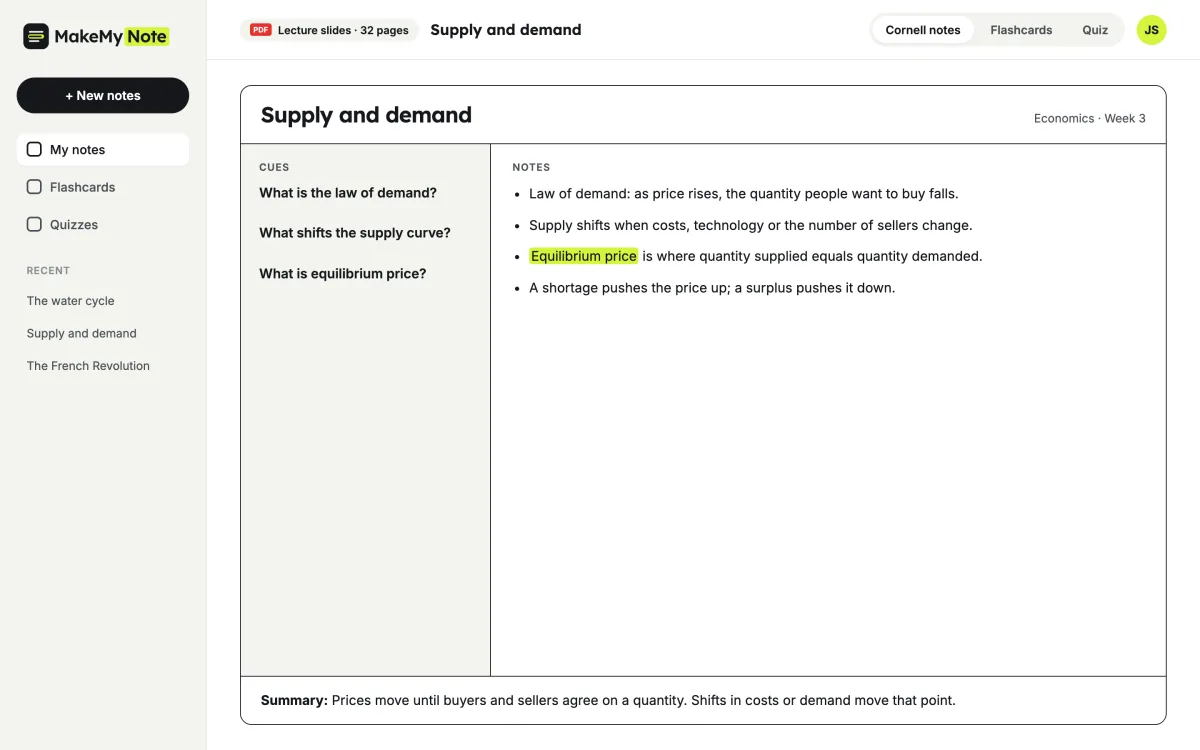
The three parts of Cornell notes
1. Cues
Short questions and keywords on the left. Cover the notes and try to answer them.
2. Notes
The main ideas from the class or reading, in short points and plain words.
3. Summary
Two or three sentences at the bottom that sum up the whole page.
How to study with them
- Read the notes once. Go through the right column to understand the topic.
- Cover and recall. Hide the notes and answer each cue question out loud.
- Review the summary. Before a test, read the summaries and practise with flashcards.
What students say
★★★★★
I always liked the idea of Cornell notes but never had time to set them up. Now the cue questions are written for me and I just test myself.
Sophie L. Psychology student, Australia
★★★★★
The summary at the bottom is perfect for a last look before class.
Jack T. High school senior, USA
★★★★☆
I turn the cues straight into flashcards. Saves me an hour every week.
Marta G. Law student, Spain
Frequently asked questions
What are Cornell notes?
A note-taking method with three parts: cue questions on the left, notes on the right and a short summary at the bottom. It was designed to make self-testing easy.
Is the Cornell notes generator free?
Yes. The free plan gives you 5 sets of notes a month, each with flashcards and a practice quiz. Pro ($7.99 a month, or $59.99 a year) removes the monthly limit and handles longer videos and files. See pricing.
What can I turn into Cornell notes?
YouTube classes, PDFs and lecture slides. Pick “Cornell notes” as the format before you start.
Can I edit the cues and notes?
Yes. You can edit every part, then turn the cues into flashcards or a practice quiz.
Can I print them?
Yes. Pro lets you download any notes as a PDF to print or share.
More free study tools
Make your first page of Cornell notes
Create a free account and try it with a class or a chapter.