
Turn handwritten notes to text
Snap a photo of your notebook and get neat, typed notes you can search, edit and share. Handwritten notes to text, then flashcards and a quiz.
- Works with photos from your phone
- Cleans up spelling and layout
- Flashcards from your own notes
From a messy page to neat notes
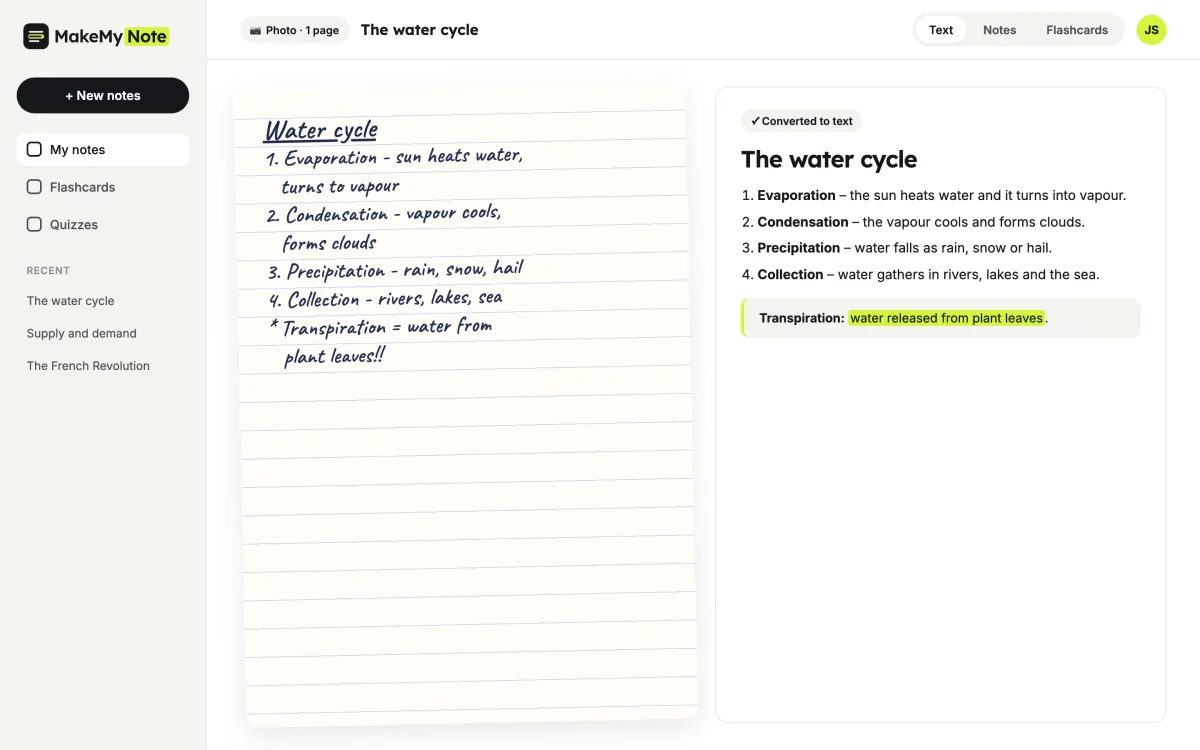
Class notes are written fast. MakeMyNote reads your handwriting, fixes the layout and turns arrows, stars and abbreviations into clear sentences.
How it works
- Take a photo. Snap your notebook page in good light, as flat as you can.
- Get clean text. MakeMyNote turns your handwriting into neat, typed notes with headings.
- Study from it. Edit, search and save your notes, then turn them into flashcards.
Tips for the best results
Good light
Daylight or a bright lamp works best. Avoid shadows across the page.
Flat page
Hold the phone straight above the notebook so lines are not curved.
One page per photo
Take a separate photo for each page so nothing gets cut off.
Dark pen
Black or blue ink is easier to read than pencil.
What you get back
Your notes keep your own words and structure. MakeMyNote just makes them neat and easy to revise.
- Headings and numbered points
- Abbreviations written out
- Key terms highlighted
- Ready to turn into flashcards
From handwriting · Geography
The water cycle
Transpiration: water released from plant leaves.
- Evaporation – the sun heats water and it turns into vapour.
- Condensation – the vapour cools and forms clouds.
- Precipitation – water falls as rain, snow or hail.
Flashcard: What is it called when water vapour cools and forms clouds?
Who it’s for
Students who write by hand
Keep writing in class the way you like, and still get typed notes to revise from.
Group study
Share neat notes with friends instead of blurry photos of your notebook.
Exam season
Turn a term’s worth of notebooks into searchable notes and flashcards.
What students say
★★★★★
I still take notes by hand because it helps me remember. Now I snap a photo after class and everything is searchable when exams come round.
Grace H. Biology student, Ireland
★★★★★
My handwriting is honestly terrible and it still got almost everything right.
Ethan C. High school junior, USA
★★★★☆
Great for sharing notes with my study group. No more blurry photos in the group chat.
Lena S. Medical student, Austria
Frequently asked questions
Is it free?
Yes. The free plan gives you 5 sets of notes a month, each with flashcards and a practice quiz. Pro ($7.99 a month, or $59.99 a year) removes the monthly limit and handles longer videos and files. See pricing.
Can it read messy handwriting?
It works best with clear handwriting in good light. Very faint pencil or heavily crossed-out pages may need a quick edit afterwards.
Which file types can I upload?
Photos in JPG, PNG or HEIC, straight from your phone camera.
Can I upload several pages at once?
Yes. Add up to 5 photos at a time on the free plan and up to 30 on Pro, and they become one set of notes.
Can I edit the text?
Yes. You can edit and save the text, then turn it into flashcards or a practice quiz.
More free study tools
Turn your notebook into notes you can search
Create a free account and upload your first photo.